OpenClaw Deep Dive: Architecture Analysis 🦞
Dissecting the engineering skeleton of a self-hosted AI assistant, based on v2026.3.8 source code

The last article covered the ecosystem. This one tears apart the architecture.
OpenClaw’s codebase is not small — 430,000 lines of TypeScript. But the interesting part isn’t the line count; it’s the architectural choices. An AI assistant that has to juggle twenty-plus chat platforms, manage multiple Agents, and invoke tools on the fly — how do you cram all of that into one system without it falling apart?
0. A Few Terms First
If you do not come from a systems background, that is fine. Six quick terms will make the rest much easier:
architecture: how a system is split into layers, and what each layer is responsible forChannel / adapter layer: the layer that speaks each external chat platform’s protocolGateway: the central coordinator that routes messages and manages sessions and AgentsNode: the execution endpoint that actually runs commands and interacts with devicesworkspace: the local folder where an Agent’s config, memory, skills, and session files livesandbox: an isolated execution environment for risky operations
1. 3-Layer Architecture: Channel -> Gateway -> Node
First, the big picture:
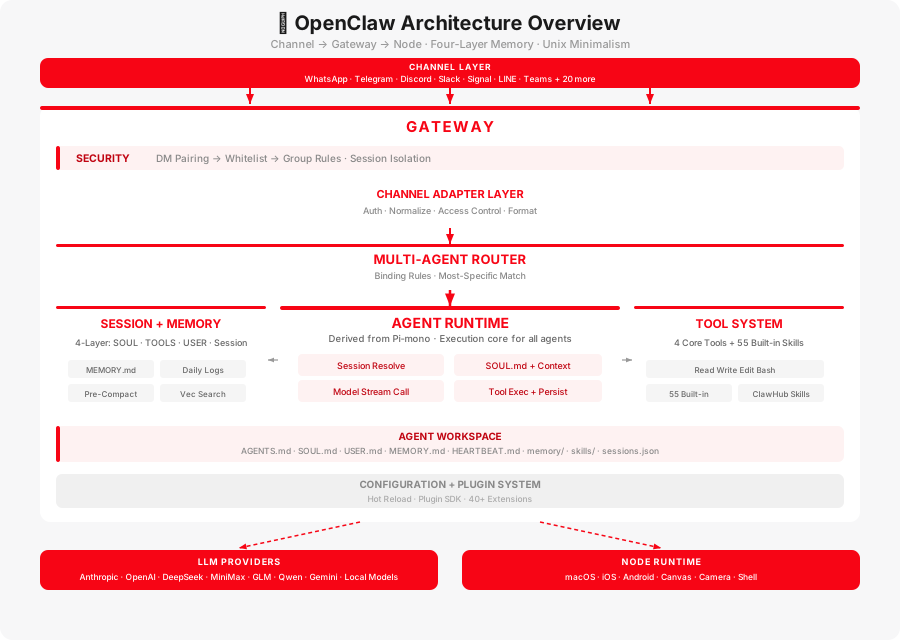
Think of OpenClaw as a company with 3 departments:
| Who | What it does | Analogy |
|---|---|---|
| Channel (Adapter Layer) | Connects to WhatsApp, Telegram, Discord, Feishu, and 20+ other chat platforms | The front desk — answers calls, receives mail, greets visitors |
| Gateway | Central dispatch; manages all sessions and Agents | The brain — decides whose message goes where and how to reply |
| Node (Execution Node) | Does things on the device — takes photos, captures screens, runs commands | The hands and feet — the brain says “take a photo,” the Node goes and does it |
The heart of the entire system is the Gateway — a long-running process that by default only listens on localhost (127.0.0.1:18789), never exposed to the public internet. Want remote access? Use a Tailscale tunnel; don’t open ports directly. This design is called “Loopback-First,” and it’s a clever security move: if you open zero ports, there’s zero attack surface.
Why a single process instead of a distributed setup? The reason is practical: WhatsApp’s protocol requires that only one device be online at a time. Spin up two processes and they’ll fight each other. Rather than piling on coordination logic for the sake of “architectural correctness,” a single process handles everything end to end. For the vast majority of personal users, that’s more than enough.
2. The Journey of a Single Message
You send your OpenClaw a message on Telegram: “What’s the weather in Beijing tomorrow?” Here’s what happens:
Step 1: Intake. The Telegram adapter receives the message and translates the Telegram-format data into OpenClaw’s internal unified format. No matter which platform the message came from, the translated result looks identical.
Step 2: Identity check and routing. Who are you? Are you allowed to talk to this Agent? If you’re a stranger, a pairing code is sent first — the owner has to approve you. Once cleared, the routing engine decides which Agent gets the message.
Step 3: Context assembly. Your previous chat history is loaded from disk, along with the Agent’s personality definition (SOUL.md), behavioral rules (AGENTS.md), and semantically relevant entries from the memory store. All of this is assembled into a complete “brain briefing.”
Step 4: Query the LLM. That briefing is sent to whichever LLM provider you’ve configured — Anthropic, OpenAI, DeepSeek, MiniMax, GLM, Qwen, Gemini, and others. The model streams its reply back token by token.
Step 5: Tool execution. If the model says “I need to run a command to check the weather,” the runtime intercepts the request and, based on security policy, decides where to execute it (admin commands run directly; stranger commands run inside a Docker sandbox). The result is fed back to the model to continue generating.
Step 6: Reply. The final answer is formatted according to Telegram’s requirements (character limits, Markdown rules, etc.), split if necessary, and sent back to you. The conversation is written to disk.
Across this entire chain, the only truly slow part is Step 4 — waiting for the model to produce its first token. Everything else is millisecond-level.
3. The Channel Adapter Layer: Build Once, Talk Everywhere
OpenClaw integrates with over twenty chat platforms, but it doesn’t write a full implementation from scratch for each one. It abstracts an “adapter” layer, and each platform’s adapter is responsible for exactly four things:
- Login: WhatsApp scans a QR code, Telegram takes a Bot Token, iMessage uses native macOS capabilities — each platform, its own rules
- Translate incoming messages: Text, images, replies, reactions — everything gets translated into the internal unified format
- Access control: Who can DM, whether the bot replies only when @-mentioned in groups, which groups are allowed
- Translate outgoing replies: Adapt the Agent’s response into the format each platform can display
Six major platforms are built in (WhatsApp, Telegram, Discord, Slack, Signal, iMessage); thirty-plus others (Feishu, LINE, Matrix, Mattermost, etc.) connect via plugins.
The biggest payoff of this abstraction: the Agent never needs to know which platform a message came from. The Agent you chat with on WhatsApp is the same one you chat with on Telegram — identical logic, fully reused. Channels are just megaphones; swapping the megaphone doesn’t change the person speaking.
4. The Agent Runtime and Workspace
The Agent runtime’s core comes from Pi-mono (an open-source coding Agent), embedded directly within the Gateway process.
The “Everything Is a Text File” Workspace
This is one of OpenClaw’s most compelling designs — every piece of configuration for an Agent is a plain text file you can open and edit directly:
workspace/├── AGENTS.md # Defines who the Agent is and how it operates (think resume + employee handbook)├── SOUL.md # Soul definition -- personality, values (set it and leave it alone)├── USER.md # User profile -- your name, preferences├── MEMORY.md # Long-term memory -- important things the Agent actively notes down├── HEARTBEAT.md # Scheduled tasks -- e.g., report weather every morning├── memory/ # The diary│ └── YYYY-MM-DD.md # One page per day, append-only├── skills/ # Skill packs└── sessions.json # Session recordsNo database, no dedicated admin panel — just plain text files. Want to change the Agent’s personality? Open SOUL.md and tweak a couple of lines. Want to see what it remembers? Open MEMORY.md and read it. That “you can see its entire brain” transparency is something most closed AI products simply cannot offer.
How Each Conversation Turn Runs
- Identify the caller: Are you the admin in a direct chat, a friend in a DM, or someone who @-mentioned the bot in a group? Different sources, different security levels
- Assemble memory: Load chat history, personality and rules, search relevant long-term memories, stitch it all into a complete context
- Query the LLM: Send to the configured model, with fallback support — if the primary model goes down, it automatically switches to the backup
- Act and remember: Execute tool calls, update the conversation log
Context assembly isn’t a brute-force dump of everything. Irrelevant skills aren’t loaded, unnecessary tools aren’t injected — saving tokens is saving money.
5. 4 Layers of Memory: Making AI Actually Remember You
Most chatbots forget you the moment you close the window. OpenClaw doesn’t. It has 4 layers of memory, from the deepest “who am I” to the shallowest “what did we just talk about”:
| Layer | What it is | Analogy |
|---|---|---|
| SOUL | Personality definition, never changes | Your character — set from birth |
| TOOLS | Currently installed skills | The tools you brought with you today |
| USER | Long-term memory about you | An old friend who remembers your favorite food |
| Session | The current conversation | The topic you’re discussing right now |
A few clever mechanisms:
Daily diary. Each day’s conversations are automatically written into memory/2026-03-12.md (append-only, never overwritten). When the next conversation starts, the Agent automatically flips through today’s and yesterday’s diary to maintain continuity — “Did you end up buying that book you mentioned yesterday?”
Automatic memory rescue. What happens when a conversation runs long and the context window is almost full? OpenClaw quietly runs an invisible turn in the background, saving critical information to MEMORY.md, then compresses the older content. You don’t notice this happening, but the key facts are preserved. This mechanism is called Pre-Compaction.
Semantic search. You say “that deployment issue we talked about before,” and it can actually find it in memory — not through exact keyword matching, but through semantic understanding. Under the hood, it’s a dual approach: vector search (SQLite-vec) plus traditional keyword search (BM25).
Cross-platform identity. You chat with it on Telegram for half an hour, then switch to WhatsApp and keep going — it knows you. The same person’s IDs across different platforms are linked to a single identity, sharing the same memory. But group chat memories are isolated — what you said in a group won’t leak into your private conversation.
6. The Tool System: Just 4 Knives
This is OpenClaw’s most “rebellious” design choice.
Other AI Agent frameworks try to cram in a hundred built-in tools. OpenClaw gives you exactly four:
| Tool | One-liner |
|---|---|
| Read | Read a file |
| Write | Write a file |
| Edit | Modify a file |
| Bash | Run a command |
That’s it. Seriously.
The founder’s logic: with a command line (Bash), you can do anything. Check the weather? curl it. Send an email? Call a CLI tool. Query a database? psql does the job. No need to pre-build a dedicated tool for every scenario.
This is the Unix philosophy — small tools, composable, text streams. The tradeoff? You need a model smart enough to figure out which command to run on its own. That’s why OpenClaw recommends a Claude Opus-tier model. Weaker models may not cut it.
On top of these four core tools, there are 55 built-in Skills and the ClawHub skill marketplace. Skills can be installed and uninstalled — think of them as apps for your Agent.
Here’s where it gets spicy: OpenClaw deliberately does not support MCP. MCP is Anthropic’s tool protocol standard, and seemingly every AI framework in the world is adopting it. OpenClaw refuses. Peter’s exact words: “MCP is garbage, it doesn’t scale. You know what scales? CLI. Unix.” The alternative is a built-in mcporter bridge.
Even more interesting is self-extension. When an OpenClaw Agent encounters something it can’t do, it writes a skill to handle it, then auto-installs it. Finds a bug in the skill? Fixes it and reloads. This means your Agent gets stronger over time through use — it’s essentially raising itself.
7. Multi-Agent Routing: One Brain, Multiple Personalities
A single Gateway can run several Agents simultaneously, each doing its own thing. The routing rules look like this:
{ "bindings": [ { "agentId": "home", "match": { "channel": "whatsapp", "accountId": "personal" } }, { "agentId": "work", "match": { "channel": "slack" } }, { "agentId": "bot", "match": { "channel": "discord", "guildId": "123456" } } ]}In plain English: messages from your personal WhatsApp go to the “home assistant,” Slack messages go to the “work assistant,” and a specific Discord server goes to the “community bot.” The three Agents are fully isolated — each with its own personality, memories, skills, and security policies.
8. Security: 3 Doors
Your Agent runs on your own server. It can execute commands and read/write files — so security is obviously a big deal. OpenClaw’s security model has three doors:
Door one: Who are you? (DM pairing) A stranger messages your Agent, and the Agent doesn’t just reply. It sends a 6-digit pairing code; you confirm it through an already-authenticated channel, and only then can the stranger interact. This is the default behavior — turn it off and anyone who knows your number can burn through your API credits for free.
Door two: VIP lane (allowlist). Trusted people can be added directly to the allowlist (allowFrom), bypassing pairing and chatting immediately.
Door three: Don’t butt in (group rules). In group chats, the Agent only replies when @-mentioned by default — it won’t pop up in response to every single message. This saves tokens and avoids annoying everyone.
Beneath these are layers of defense in depth: five-tier tool permission filtering, Docker sandbox isolation (stranger commands run in the sandbox), and security audit commands (openclaw security audit). These layers are independent — pairing code compromised? The sandbox is still there. Sandbox bypassed? Tool policies still restrict what can be called.
9. Takeaways
Single-process isn’t laziness; it’s pragmatism. For individual users, one process handling everything is far more reliable than a distributed setup. Where’s the ceiling? Probably when concurrent message volume exceeds what a single machine can handle — and for the vast majority of people, that day will never come.
The channel abstraction layer is the most valuable layer. Twenty-plus platforms’ quirks are fully encapsulated in adapters; the Agent doesn’t care where a message came from. Want to add a new platform? Write an adapter — zero changes to Agent logic. The decoupling is exceptionally clean.
The security design is serious, but the implementation still has gaps. Architecturally, identity verification, sandboxing, and tool policies create defense in depth. But Kaspersky’s audit found 512 vulnerabilities (8 critical), showing that the distance between a sound blueprint and actual security is measured in sustained engineering effort.
The four-core-tool minimalism is a bet. It’s a bet that model capabilities will keep climbing — powerful enough that you won’t need pre-built tools, because “everything is Bash-able.” If LLM capabilities plateau, this path gets tough. But if model intelligence keeps rising, this might be the most elegant approach there is.
The ultimate test isn’t how pretty the architecture is, but how reliably it runs. This analysis is based on static source code reading. Real-world performance — Gateway stability under high concurrency, whether the sandbox truly withstands attacks, edge cases in cross-channel identity linking — needs more production data to verify.
Architecture is just the skeleton. Production is the exam.
Comments